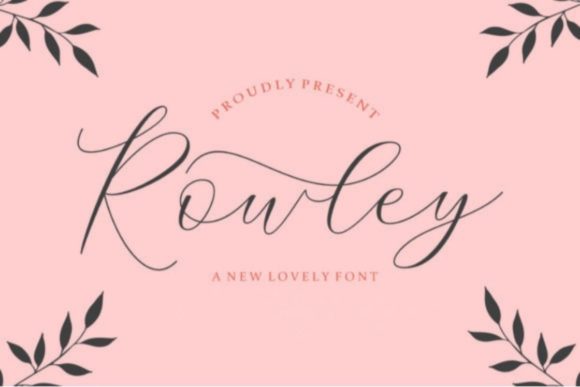
Rowley Script: A Delicate Handwritten Font for Elegant Designs
Rowley Script is a beautifully crafted handwritten font that brings a touch of elegance and personalization to any design project. Its smooth lines, varying baseline, and stunning alternates make it ideal for wedding invitations, thank you cards, logos, and more. Whether you're a designer or a beginner looking to add a handwritten feel to your work, Rowley Script can be a powerful tool if used correctly.
Why Choose Rowley Script?
Rowley Script stands out due to its delicate and organic appearance. Unlike rigid sans-serif fonts, this script font mimics the natural flow of handwriting, making it perfect for creating a warm and inviting aesthetic. It features a variety of glyphs and alternates that allow for creative expression and customization.
Its versatility makes it suitable for both digital and print media. Designers often use it in branding materials, greeting cards, and even website headers to create a sense of authenticity and charm. However, there are some common pitfalls that users may encounter when choosing and using Rowley Script.
Common Mistakes When Using Rowley Script
While Rowley Script is visually appealing, it's easy to misuse it in ways that can negatively impact the overall design. One common mistake is using it in large blocks of text. Since it's a script font, it can be difficult to read when used for long paragraphs. This can lead to poor readability and a cluttered appearance.
Example: A designer might use Rowley Script as the primary font for a website's body text, assuming it will look elegant. However, this choice can make the content hard to read, especially for users with visual impairments or those who prefer quick scanning.
Better approach: Use Rowley Script sparingly for headings, quotes, or short phrases. Pair it with a clean, readable sans-serif or serif font for body text to maintain clarity and accessibility.
Overlooking Font Pairing
Another frequent error is not considering how Rowley Script pairs with other fonts. While it looks lovely on its own, combining it with the wrong typeface can result in an unbalanced or unprofessional design. For instance, pairing it with another ornate script font might create visual confusion.
Example: A business card using Rowley Script alongside an overly decorative cursive font could appear chaotic and unrefined.
Better approach: Choose complementary fonts that provide contrast without clashing. A simple sans-serif font like Helvetica or Arial works well with Rowley Script, offering a modern yet elegant look.
Ignoring Kerning and Spacing
Rowley Script has unique spacing and kerning requirements due to its flowing style. Failing to adjust these settings can lead to awkward letter spacing, which detracts from the font's beauty and professionalism.
Example: A logo designed with Rowley Script might have letters that are too close together, making it look cramped and unappealing.
Better approach: Take the time to fine-tune spacing and kerning manually or use font tools that offer automatic adjustments. This ensures that the final design looks polished and professional.
What to Check Before Using Rowley Script
Before deciding to use Rowley Script in your project, consider several factors to ensure it meets your needs and expectations. First, evaluate whether the font is appropriate for the intended purpose. Is it for a formal event like a wedding invitation, or something more casual like a greeting card? Understanding the context helps determine if Rowley Script is the right fit.
Next, check the licensing terms. Some fonts require purchase for commercial use, while others are free for personal projects only. Always confirm the usage rights before downloading or purchasing Rowley Script.
Additionally, consider the platform or software where you'll be using the font. Ensure that Rowley Script is compatible with your design tools, such as Adobe Illustrator, Photoshop, or Canva. Incompatibility issues can cause frustration and delays in your workflow.
Practical Tips for Using Rowley Script Effectively
To get the most out of Rowley Script, follow these practical tips:
- Use it for emphasis: Apply Rowley Script to headlines, titles, or call-to-action buttons to draw attention without overwhelming the reader.
- Experiment with alternates: Many versions of Rowley Script include alternate characters that can enhance the visual appeal of your design. Explore these options to find the best match for your project.
- Test across devices: Make sure Rowley Script displays correctly on different screens and resolutions. A font that looks great on a desktop might not render well on a mobile device.
- Limit its use: As mentioned earlier, avoid using Rowley Script for long passages of text. Reserve it for short, impactful phrases where its handwritten charm can shine.
By keeping these considerations in mind, you can avoid common mistakes and achieve a professional, aesthetically pleasing result with Rowley Script. Its delicate and elegant style offers endless possibilities for creative expression, but success depends on thoughtful application and careful planning.